
HAPS Exam Frequently Asked Questions
Check out the following slides for more information on the HAPS Exam Program as of May 2024. The HAPS Exam program has grown to include a number of exams and different delivery methods. The exam can now be administered on student-owned devices in a classroom setting, administered on loaner (institutional owned) devices, or provided in a computer lab setting. Questions below are organized by delivery option.
Exams include a
- 100-question Anatomy Exam
- 100-question Comprehensive A&P Exam,
- A&P I and A&P II variants of the Comprehensive Exam
- A Physiology Exam is planned in the future.
General Questions About HAPS Exams
Are there any example practice questions available?
Yes, there are 15 example questions for the A&P exams here. These are not actual questions, but rather ones written to highlight the organization of the questions.
Are there a time limits on the HAPS exams?
Yes, the 100-question comprehensive A&P exam and 100-question Anatomy exam both have a 2-hour time limit. The 44-question A&P 1 exam has a 45-minute time limit. The 56-question A&P 2 exam has a 60-minute time limit. All instructors have the option to add additional time and/or request a non-secure option for users needing accommodation. This will need to be noted on the student roster uploaded at the time of placing the exam order. The time scheduled for an exam is limited by the amount of time each exam requires.
While taking an exam, can the students return to a previously-answered question?
Yes. There is a backward navigation option as well as a missing answer reminder.
Do students get the same questions?
Students take the same exam, with the same questions, in the same order.
Can an instructor take an exam to see the content?
No, instructors may not take any HAPS exam to evaluate its content, both for security reasons and to standardize the preparation that all students have before taking the exam. The HAPS Learning Outcomes are available to guide preparation, but there is no specific HAPS-approved exam study guide for students.
What if I have fewer than 15 students in my class?
Just contact the HAPS Exam Team and explain your situation. If you have a small class we will just need to hear from you. Exam orders of fewer than 15 can only schedule one exam time if choosing to administer the exam at your institution. Small orders do not change off-site proctoring options.
What kind of score reporting can I expect?
The HAPS Exam Team will email student scores within 2 business days of the exam day. An overall summary (Mean, Median, High and Low Score) as well as each student’s performance per LO category.
Where can I get my questions answered about a HAPS online exam?
The HAPS Exam Team is ready to help you with your questions! Just send them an email and you will typically receive a response within one business day. If you have a billing question, contact the HAPS office at 706-845-8204.
Administering and Proctoring an Exam at Your Institution
What are the steps I need to follow to proctor a HAPS exam for my students at my institution?
Giving the HAPS exam is easy and secure. You just need to follow these simple steps:
1. Order the exam of your choice, upload your student roster, and pay for the number of exams that you need.
2. After receiving instructions from the HAPS Exam Team, you’ll notify students to keep an eye out for an email asking them to download Examplify (if using student-owned devices) and/or set-up their Examplify account (all delivery methods). If the exam is being delivered via a computer lab or loaner devices, the HAPS Exam Team will provide software download instructions to the Lab Manager/Administrator.
3. On exam day, you will provide the assessment password (provided by the HAPS Exam Team) and the students will begin the exam.
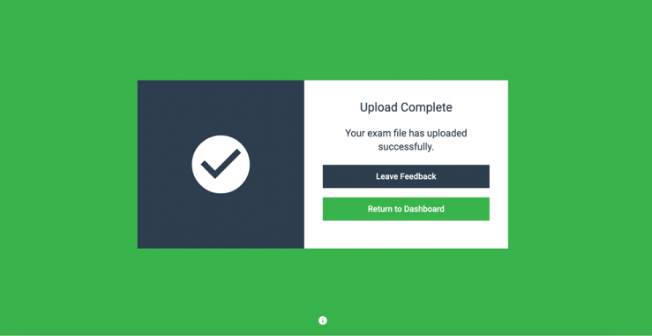
4. Once students are done and their exam has been safely submitted, you should see the green upload complete screen (photo below).
5. Exam scores will be shared with you by the HAPS Exam Team within two business days
See the timeline, refund policy, and reschedule policy for exams administered and proctored at your institution.
Is there a way to make sure devices will work?
Yes. For student-owned devices all students will have access to the mock exam once they’ve downloaded Examplify and created an account. Students can verify their device works by taking the mock exam. For Lab and Loaner delivery, the Exam Team can provide one free mock exam to instructors or Lab Managers/Administrators. Please note this only the mock exam that is used to validate device compatibility and is used to understand how to navigate the exam. Instructors will not be able to take the actual exam.
I have a student with an ADA certified disability who needs extra time to take the exam. Can this be done?
Yes, time accommodations are built into the exam software. If a student requires additional time, please make sure to include this on the student roster before uploading it to your order form. The request will be reflected once the roster is uploaded into the assessment
Why is an assessment password required?
This is to ensure students being proctored on-site are the only ones accessing the live exam. It is important to document any students who are absent on exam day and compare that list with the exam scores received afterward to verify that all students who completed the exam were properly proctored and that no scores were submitted for students who were absent.
Are there time limitations on when an exam can be scheduled?
The Exam team is located in the Eastern Time Zone. If you wish to receive support for technical issues, we advise scheduling your exam during this time period: starting at 7:30 AM Eastern to 8 PM Eastern. Outside of those times, the Exam team will be unavailable and you may receive delayed responses if you encounter any issues.
Can I make last-minute changes to my exam dates, times, or number of students?
No, not at the last minute. Students need to be registered and scheduled to take the exam, and this process takes some time to complete – we suggest that this be completed at least 10 business days before the exam. If you have changes after your initial order/roster upload, you must contact the HAPS Exam Team and have everything resolved at least 5 business days before your scheduled exam to avoid test-day difficulties. HAPS is unable to guarantee any technical assistance fewer than five business days before the scheduled exam time.
Can I schedule the exam to be open all day or for multiple days?
No, the exams are scheduled for specific time periods based on the duration of the exam. The assessment download window end time will be set to close one hour after the exam starts. For example, if the exam start time is scheduled for 10:00 am, a student entering at 10:50 am will be able to enter the assessment password and download the exam. That student will have the allotted time (120-minutes for Comprehensive A&P or Anatomy, 45-minutes for A&P 1, and 60-minutes for A&P 2) to take the exam. If a student were to enter at 11:00 am, the download window will be closed and the exam will not be available to access, even with the password.
Instructors will upload rosters for each specific exam period, so rosters will also need to be clarified in advance. A typical exam order will contain one or two scheduled exam times. Orders that include many exam times with few students in each period may not be eligible for quantity discounts, as the scheduling workload it greater.
If you would like to open a long window of exam access, the off-site proctoring method is designed to allow this approach.
What happens if a student’s device shuts down or loses power in the middle of the exam?
The HAPS Exam Team will provide you with a universal resume code. This will allow the student to enter back into the exam. If this happens, the maximum time the student will lose on the exam is up to 7 minutes.
Exam Fee Structure
Starting July 1st, 2026 prices:
- Under 15 exams $24 each
- 15 – 100 exams $17.50 each
- 100+ exams $15 each